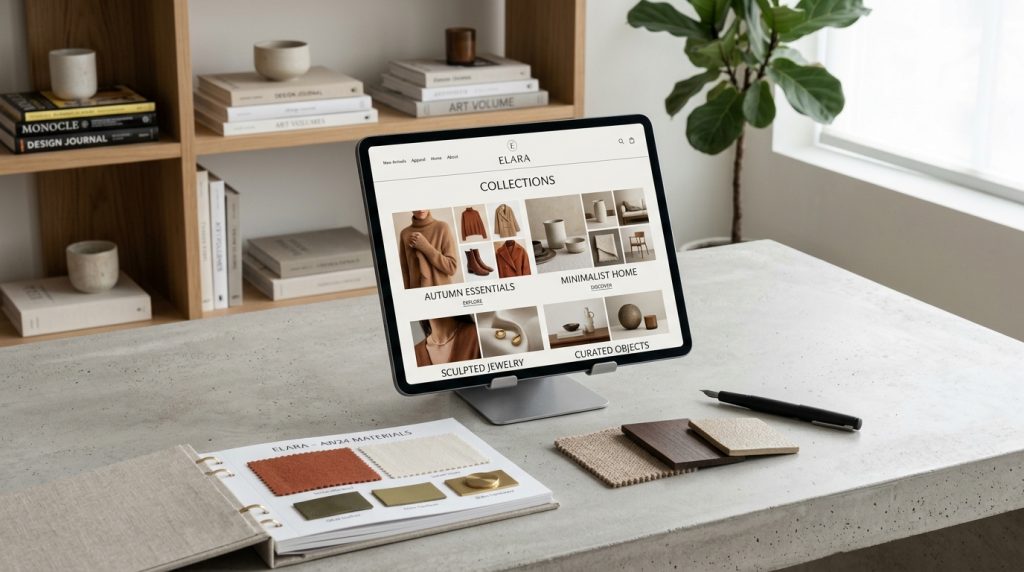
Collections are how Shopify organizes products into groups. Instead of showing customers everything at once, you group products into categories that make browsing easier. Shirts, pants, and dresses in clothing stores. Kitchen, living room, and bedroom in furniture stores. Electronics, accessories, and repair kits in tech stores.
Well-organized collections make stores feel navigable and professional. Poorly organized collections create confusion and lost sales. The difference between the two shows up in browsing patterns and conversion rates.
This piece covers what collections are, how to create them, and how to organize your store to help customers find what they want.
What Collections Actually Are
The concept is straightforward but has details.
Groups of Products
Collections group related products. Customers see the group and browse products within it.
Multiple Uses
Collections serve several purposes. Navigation categories. Featured selections. Sale groupings. Seasonal displays. Any way you want to group products.
Products Can Be in Multiple Collections
A red dress can be in the “Dresses” collection, the “Red” collection, and the “Sale” collection simultaneously. Products belong to multiple collections as needed.
Collection Pages
Each collection has its own page in your store. Customers browse products through these pages.
URL Structure
Collection URLs typically follow the pattern yoursite.com/collections/collection-name.
Types of Collections
Shopify supports two types.
Manual Collections
You individually add specific products to the collection. Full control over what appears.
Good for curated selections, featured items, specific bundles, or small controlled groupings.
Automated Collections
Products get added automatically based on criteria you set. All products with a specific tag. All products above a certain price. All products from a specific vendor.
Good for large catalogs where automation saves work. Also good for dynamic collections that update as inventory changes.
Choosing Between Them
For controlled, specific groupings: manual.
For large or dynamic groupings: automated.
Many stores use both types for different purposes.
Creating Manual Collections
The process for controlled groupings.
Navigate to Collections
In Shopify admin, click Products, then Collections. Click Create collection.
Enter Collection Details
Title: what the collection is called. Descriptive is better than clever.
Description: what the collection contains. Appears on the collection page.
Set Type to Manual
Under Collection type, choose Manual.
Add Products
Search for products and add them to the collection.
Set Visibility
Available on your online store. Set publication status.
Configure SEO
Optimize the URL, title tag, and meta description for search.
Save
Save the collection.
Creating Automated Collections
The process for dynamic groupings.
Set Type to Automated
Under Collection type, choose Automated.
Set Conditions
Choose the criteria. Product tag equals summer. Product type is dress. Price is greater than $50. Multiple conditions can combine.
Choose Match Logic
Match all conditions or match any condition.
Preview Results
See which products match the conditions. Adjust criteria if needed.
Save
Save the collection. Products matching criteria automatically populate it.
Ongoing Automation
As you add new products with matching criteria, they appear in the collection automatically. As tags change, products move between collections.
Setting Up Store Navigation Around Collections
Collections become the browsing structure.
Main Menu Structure
Your main menu typically links to top-level collections. Categories that customers would think of as browsing categories.
For a clothing store: Shirts, Pants, Dresses, Accessories, Sale.
For an electronics store: Phones, Laptops, Audio, Accessories, Deals.
Sub-Categories
For larger catalogs, sub-categories help. Shirts might contain T-Shirts, Button-Ups, Sweaters.
Shopify’s menu structure supports sub-menus. Configure them for logical hierarchy.
Footer Links
Footer often includes additional collections that do not warrant main menu space. Complete category listings. Sale collections. Featured selections.
Sidebar Navigation
Some themes include sidebar navigation on collection pages. Filters and sub-categories help refine browsing.
Organizing Collections Effectively
Structure matters more than most people realize.
Think Like a Customer
How do customers think about your products? Organize collections to match their mental models, not your inventory management.
Customers do not think in vendor terms usually. They think in category and use terms.
Categories First, Then Sub-Categories
Top-level categories should be broad enough to cover distinct product types. Sub-categories provide detail.
Consistent Naming
Category names should follow patterns. Not “Men’s Shirts” and “Women Tops” in the same store. Consistency matters.
Reasonable Depth
Menus more than three levels deep get confusing. Try to keep hierarchy shallow.
Balance Between Broad & Specific
Very broad categories force too much browsing. Very specific categories create too many navigation choices. Find balance.
Highlight Popular Groupings
Featured collections, best sellers, new arrivals get special placement.
Collection Page Design
The page where customers browse.
Collection Header
Title, description, and often a hero image. Sets context for the browsing.
Product Grid
Products displayed in a grid or list. Grid is standard for most stores.
Filtering
Filters let customers narrow the display. Price range, color, size, brand. Common filter categories help with large collections.
Sorting
Sort options let customers reorder the display. Featured, price low to high, price high to low, newest, best selling.
Pagination or Load More
For collections with many products, some way to see additional products. Pagination or load more or infinite scroll.
Products Per Page
Configure how many products show per page. Balance between showing enough choice and page load time.
SEO for Collections
Collections can drive significant search traffic.
Optimize Collection Titles
Titles should include search terms. “Women’s Dresses” rather than just “Dresses” if that fits your store.
Write Real Descriptions
Collection descriptions should be substantial. Explain what is in the collection. Include relevant keywords naturally.
Optimize URL Slugs
Collection URLs matter for SEO. Include target keywords. Keep them clean.
Meta Tags
Meta title and meta description for each collection. Optimize for search.
Internal Linking
Link to collections from relevant places. Product descriptions can link to the collections they belong to. Blog posts can link to relevant collections.
Structured Data
Ensure collection pages have proper schema markup. Most themes handle this, but verify.
Homepage Collection Displays
Collections often feature prominently on homepages.
Featured Collection Section
Most themes have sections that display featured collections. Set which collections appear.
Collection List
Section showing multiple collections with images. Good for showing the range of what you offer.
Slideshow With Collections
Rotating displays showing different collections. Effective for promotional content.
Rotating Featured
Different featured collections at different times. Seasonal, promotional, or based on business goals.
Special-Purpose Collections
Some collections serve specific goals.
New Arrivals
Recently added products. Automated based on product creation date or a “new” tag.
Keeps returning customers seeing fresh content.
Sale
Products currently on sale. Automated based on products having compare-at-prices, or based on a “sale” tag.
Drives urgency and promotional shopping.
Best Sellers
Top-selling products. Some apps automate this. Or manually curate based on your data.
Featured
Curated products you want to promote. Manual collection.
Related to a Story
Collections tied to a specific event, story, or campaign.
Managing Many Collections
For stores with extensive catalogs.
Consistent Structure
As you add collections over time, maintain consistent structure. Otherwise the catalog becomes fragmented.
Regular Cleanup
Periodically review collections. Delete ones no longer needed. Reorganize as the catalog evolves.
Tag Discipline
Automated collections depend on tags. Consistent tagging keeps collections accurate. Inconsistent tagging creates messy collections.
Documentation
For teams managing collections, document the structure. What tags mean. How collections are organized. This prevents confusion.
Common Collection Mistakes
Store owners stumble in predictable ways.
Too Few Collections
One giant “Products” collection. Customers cannot browse effectively.
Too Many Collections
Every product in five collections. Overwhelming navigation. Duplicate content issues.
Poor Naming
Collection names that do not match how customers think. Internal jargon instead of customer language.
Empty Collections
Collections that get created but never populated. Or collections that had products but no longer do. Both look bad.
Inconsistent Organization
Different sections of the store using different organizational logic. Confusing to browse.
Ignoring SEO
Collection pages that could rank in search but have weak SEO setup.
Not Updating
Collections that reflect the store from years ago rather than current inventory.
Dead Collections in Navigation
Menu items pointing to collections that no longer serve a purpose. Confuses navigation.
Analytics for Collections
Understanding how collections perform.
Traffic Sources
Where do collection page visitors come from? Direct navigation? Search? Referrals?
Conversion Rates
Which collections convert best? Which underperform?
Product Performance Within Collections
Which products within collections drive sales? Which get views but no conversions?
Search Terms
What search terms lead to your collections? This tells you what customers are looking for.
Bounce Rates
Collections with high bounce rates might have organization or expectation issues. Investigate.
Closing Thoughts on Product Organization
Collections are the browsing structure of your Shopify store. Good organization helps customers find what they want. Poor organization loses sales.
For most stores, thoughtful collection structure matters more than most owners realize. The temptation to create collections ad hoc without planning leads to messy organization that hurts the business.
For new stores, plan the collection structure before adding many products. Think about how customers will browse. Design categories around customer thinking, not inventory management.
For existing stores with unclear structure, reorganizing is disruptive but sometimes necessary. If customers cannot find products, that is a problem worth solving.
The technical work of creating collections is simple. The strategic work of organizing them well takes more thought. Both matter for a store that actually helps customers buy.
Collections also matter for SEO. Well-optimized collection pages drive organic search traffic. Weak collection pages leave that traffic on the table.
For growing stores, collections evolve. New product categories emerge. Old ones become less relevant. Seasonal collections come and go. Regular attention to collection structure keeps the store organized as it changes.
For most stores, spending time on collection structure and optimization is worthwhile. The customer experience improves. Conversions improve. Search traffic improves. The store feels more professional and easier to shop.
Take collections seriously. Plan them before creating them. Optimize them for search and browsing. Review them periodically. The organization work pays back through every customer who successfully finds what they wanted, purchases it, and comes back for more. Products may be what you sell, but collections are how customers navigate to them. Get the navigation right, and the products get discovered by the customers who want them.