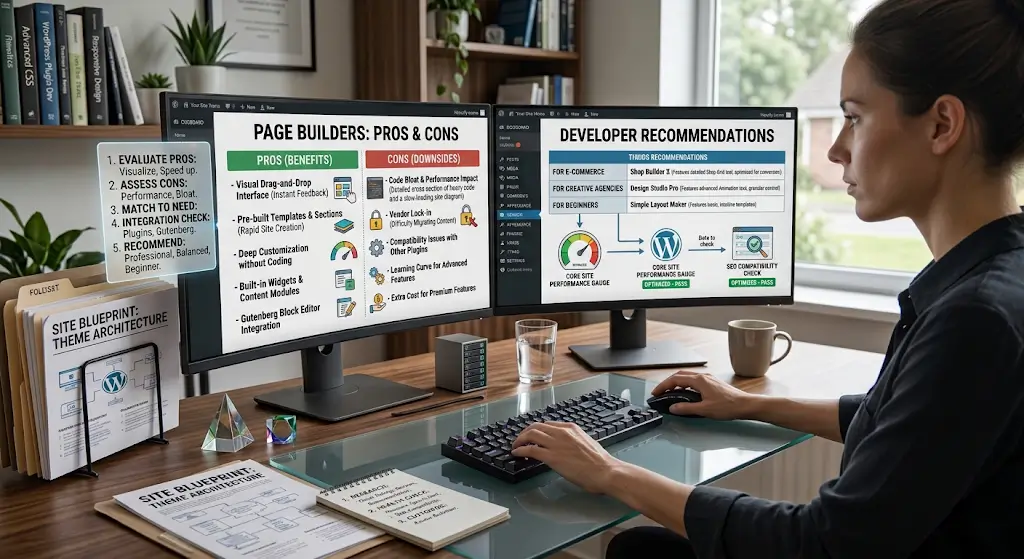
Page builders have changed how many people build WordPress sites. What used to require coding knowledge or expensive designers can now be done by dragging and dropping elements on a page. The visual editors let anyone build reasonably professional-looking pages without technical skills.
The trade-offs are real though. Page builders add weight to your site. They lock you into specific ecosystems. They can slow down performance. Choosing a page builder is a decision that affects your site for years.
This piece covers what page builders actually do, the main options in the market, when to use them, and how to pick one that fits your needs.
What Page Builders Actually Do
The basic idea is straightforward.
Visual Editing
Instead of writing code or configuring settings, you see the page as you build it. Drag an image where you want it. Add a text block. Adjust spacing visually. The changes appear immediately.
Pre-Built Elements
Page builders include libraries of elements you can add. Headers, buttons, testimonials, contact forms, image galleries, pricing tables, and dozens of others. You do not build these from scratch. You customize existing components.
Template Libraries
Most page builders include template libraries. Pre-designed pages for various purposes. Landing pages, about pages, service pages, contact pages. Start with a template. Customize to fit your needs.
Layout Control
Detailed control over layouts. Column widths, spacing, alignment, responsive behavior. All controlled visually rather than through code.
Beyond the Editor
Some page builders extend beyond page editing. Theme building, header and footer design, popup creation, form building, e-commerce customization. The scope depends on the builder.
The Case For Page Builders
Several reasons people use them.
No Coding Required
The main appeal. People who cannot code can build reasonably good-looking pages. Business owners can update their own sites. Designers can implement their own work.
Fast Turnaround
Building pages with a page builder is faster than coding from scratch, and often faster than working with themes that require configuration through multiple settings screens.
Visual Feedback
Seeing changes immediately as you make them speeds up design decisions. No switching between code editor and preview to see how changes look.
Consistency
Page builders help maintain design consistency across pages. Global settings for colors, fonts, and spacing propagate everywhere.
Template-Based Speed
Starting from a template that mostly fits your needs is much faster than starting from scratch. Adjust the template to match your brand and content.
Client Handoff
For agencies and freelancers, page builders let clients update their own content after project completion. This can be a selling point.
The Case Against Page Builders
Real drawbacks come with the benefits.
Performance Impact
Page builders add code to every page. Extra CSS, extra JavaScript, extra HTML. Even lightweight page builders add weight. Heavy page builders add significant weight.
The performance impact affects page load times, which affect SEO and user experience.
Vendor Lock-In
Once you build with a page builder, moving away is hard. The content is stored in the builder’s format. If you deactivate the builder, pages look broken. If you switch builders, you have to rebuild pages.
Learning Curve
Each page builder has its own interface, terminology, and quirks. Learning one builder well takes time. Switching means learning another.
Cost
Premium page builders cost money. Some have subscription models. Over years, the cost adds up.
Complexity Under the Hood
The visual simplicity of page builders hides complex code underneath. The HTML and CSS that gets generated is often not clean. This affects performance and can create issues.
Update Risks
Page builder updates sometimes break existing sites. What worked yesterday might not work today after an update.
Compatibility Issues
Page builders sometimes conflict with themes, other plugins, or specific WordPress features. Resolving conflicts can be time-consuming.
Popular Page Builders
Several products dominate the market.
Elementor
The most popular page builder. Free and Pro versions. Very active development. Large community. Extensive third-party addon ecosystem.
Elementor is capable and widely supported. Some concerns about performance and how many people use it (making it a target for issues).
Divi
Made by Elegant Themes. Comes bundled with the Divi theme. Long history in the WordPress space.
Divi is powerful with many features. Some concerns about heavy code and lock-in.
Beaver Builder
Focused on stability and clean code. Less flashy than Elementor or Divi but often faster and more reliable.
Beaver Builder is a favorite of many developers because of its cleaner code and stability.
Bricks Builder
Newer entrant. Focused on performance and modern web standards. Grew quickly among developers.
Bricks is fast and clean but has a smaller ecosystem than the established builders.
Oxygen Builder
Aimed at developers. Very lightweight and clean output. Steeper learning curve than more visual builders.
Oxygen is powerful for those who can learn it but not the right choice for beginners.
WPBakery Page Builder
Formerly called Visual Composer. Older builder often bundled with premium themes on ThemeForest.
WPBakery is dated and generally not recommended for new sites, but exists on many sites due to theme bundling.
Gutenberg (Block Editor)
WordPress’s built-in editor is technically a page builder. The next piece in this series covers Gutenberg in detail.
Gutenberg is free, built-in, and continues to improve. Some sites can use Gutenberg alone without needing an external page builder.
Kadence Blocks & Similar
Some page builder alternatives extend Gutenberg with additional blocks. Kadence Blocks, GenerateBlocks, and Stackable are examples.
These provide page-builder-like functionality within the Gutenberg framework. Lighter than full page builders. Good middle ground for many sites.
When Page Builders Make Sense
Some situations favor page builders.
Non-Technical Users Building Complex Sites
If you cannot code but need pages more complex than what themes typically provide, page builders fill the gap.
Design-Heavy Sites
Sites where visual design is central. Portfolios, agencies, creative businesses. Page builders make custom design accessible.
Landing Page Focus
Marketing sites with many landing pages benefit from the template-based speed of page builders.
Frequent Content Updates
Sites where non-technical staff regularly need to update pages benefit from the visual editing of page builders.
Rapid Prototyping
For quickly testing site designs and layouts, page builders enable fast iteration.
When Page Builders Are Not the Right Choice
Other situations favor different approaches.
Performance-Critical Sites
If site speed is essential (high-traffic sites, e-commerce with conversion sensitivity), the weight of page builders may be a problem. Lighter alternatives make sense.
Simple Sites
For simple sites with basic pages, page builders are overkill. Themes with good customization options or the Block Editor handle basic sites well.
Sites With Developer Resources
If you have developers, custom themes often produce better results than page builder sites. Cleaner code, better performance, more flexibility.
Standard Blog Sites
For content-focused sites where posts are the main product, page builders offer little advantage over the Block Editor.
Long-Term Business Sites
For sites you expect to run for many years, the vendor lock-in of page builders is a real concern. Custom themes provide more long-term flexibility.
Picking a Page Builder
The right choice depends on your situation.
Consider Your Skill Level
For beginners, Elementor and Divi are the most accessible. For more technical users, Bricks or Oxygen offer more control.
Consider Your Performance Needs
If performance is a priority, Bricks and Oxygen are lighter. Elementor and Divi are heavier.
Consider Your Budget
Elementor has a free version. Beaver Builder, Bricks, and Oxygen require paid licenses. Divi comes with the theme purchase.
Consider Your Ecosystem
Elementor has the biggest ecosystem of addons and themes designed for it. If you want many third-party additions, Elementor’s ecosystem is the largest.
Consider Your Long-Term Direction
If you expect the site to grow significantly, consider how well the page builder scales and whether you might want to move away from it later.
Setting Up a Page Builder
The process is similar across builders.
Install the Builder
For free versions, install from the WordPress plugin directory. For premium versions, download from the vendor and upload to your site.
Activate a Compatible Theme
Page builders work best with themes designed for them. Astra, GeneratePress, Kadence, and OceanWP work well with most builders. Divi requires the Divi theme.
Configure Global Settings
Set colors, fonts, and default spacing at the global level. This prevents inconsistency across pages.
Learn the Interface
Spend time in the tutorials for your chosen builder. Understand how sections, columns, and elements work in that builder.
Start With a Template
Rather than building from scratch, start with a template that is close to what you need. Customize from there.
Build a Style Guide Page
Create a page that uses all your standard elements with your correct styling. This becomes a reference for future pages.
Common Page Builder Mistakes
Users stumble in predictable ways.
Over-Building Pages
Every element you add slows down the page. Many people add too much because the builder makes it easy. Simpler pages are usually better.
Ignoring Performance
Building great-looking pages without checking speed leads to slow sites. Test performance regularly.
Not Using Global Settings
Setting styles per-element instead of using global settings creates inconsistency and makes changes harder.
Building Everything With the Builder
Blog posts often do not need page builder features. The Block Editor handles them well. Save the page builder for pages that benefit from it.
Ignoring Mobile
Page builders let you customize per-device but many users forget to check mobile. Test on mobile devices, not just desktop.
Deep Nesting
Deeply nested elements create fragile layouts. Simpler structures work better.
Fighting the Builder
Some builders are opinionated. Trying to force them to do things they were not designed for creates fragile results.
Migrating Between Page Builders
Sometimes you need to switch. It is difficult.
Content Does Not Transfer Cleanly
Each builder stores content in its own format. Switching means the pages built with the old builder need to be rebuilt with the new one.
Plan the Migration
For sites with many pages, migration is a major project. Plan it carefully. Prioritize the most important pages. Accept that some pages may take a while to migrate.
Consider Whether to Switch
Sometimes the pain of migration is worse than the pain of staying. Evaluate honestly before committing.
Alternatives to Full Page Builders
Other approaches offer some of the benefits without the drawbacks.
Gutenberg With Block Libraries
Adding block libraries like Kadence Blocks, GenerateBlocks, or Stackable to Gutenberg provides page-builder-like functionality with less overhead.
Themes With Built-In Options
Some themes provide extensive customization without needing page builders. Kadence, Astra, and GeneratePress all have Pro versions with many options.
Custom Themes
For sites with technical resources, custom themes provide the flexibility of page builders without the overhead. More expensive to build initially but often better long-term.
Static Site Generators
For content-focused sites, static site generators like Hugo or Eleventy produce fast sites without WordPress overhead. Different workflow but excellent performance.
What Page Builders Cannot Do Well
Understanding limits helps.
Very Custom Layouts
Highly custom, unusual layouts often push page builders to their limits. Custom code sometimes produces better results.
Very Complex Sites
Sites with unusual data structures, integrations, or workflows often need more than page builders provide.
Truly Optimized Performance
Even the lightest page builders add weight. For extreme performance requirements, hand-coded solutions perform better.
Full Design Freedom
Page builders work within their frameworks. Truly custom designs sometimes require breaking out of the framework.
Bringing the Page Builder Picture Together
Page builders have made WordPress accessible to many people who could not otherwise build sites well. The visual editing, template libraries, and pre-built elements provide real value for the right situations.
The trade-offs are real too. Performance impact. Vendor lock-in. Complexity under the hood. Cost over time. Each factor matters differently for different sites.
For most business sites without technical resources, a good page builder makes sense. Pick one that fits your needs. Learn it well. Use it effectively. The productivity gains outweigh the drawbacks for most non-technical users.
For sites with technical resources, custom themes or lighter alternatives often make more sense. The flexibility and performance benefits usually outweigh the additional development effort.
For content-focused sites, the Block Editor with block libraries provides much of what page builders offer with less overhead.
The choice is not universal. It depends on your specific situation, skills, resources, and goals. The right choice makes running the site easier. The wrong choice creates ongoing friction.
If you are considering a page builder, evaluate honestly. What do you need it to do? What are you willing to trade for the ease of use? What alternatives might serve you better? Answering these questions leads to a better decision.
For sites that already use a page builder that is not working well, evaluating whether to switch is worth doing periodically. The pain of migration is real but sometimes worth it if the current builder is holding you back. For most sites though, sticking with a decent-enough choice is better than the disruption of switching. The right page builder becomes a productive tool. The wrong one becomes an ongoing frustration. Take the time to choose well, and the page builder becomes a foundation that supports your work rather than something you fight with constantly.