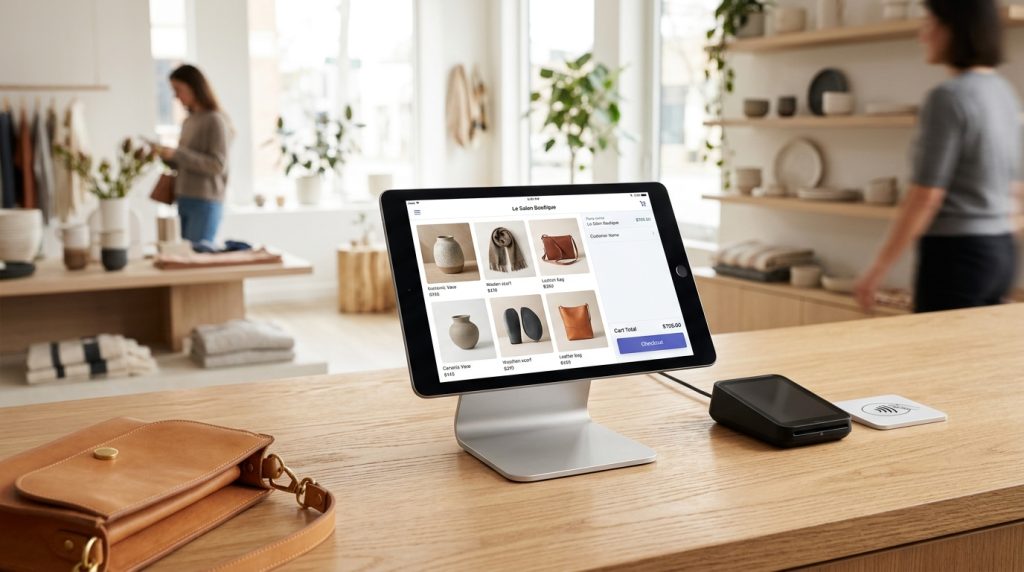
Shopify started as an online store platform, but the company has expanded significantly into physical retail. Shopify POS lets you sell in person at markets, pop-ups, retail stores, and events. The system integrates with your online Shopify store, keeping inventory and customer data synchronized across channels.
For businesses that combine online and offline sales, Shopify POS provides a unified system that handles both. For businesses starting with pop-ups or markets, it offers professional retail capabilities without requiring separate systems.
This piece covers what Shopify POS does, how it works, and how to set it up for your business.
What Shopify POS Actually Is
The system explained.
Retail Point of Sale
POS stands for point of sale. It is the system that handles in-person transactions. Traditionally, cash registers. Modern POS systems are software running on tablets or phones with card readers.
Shopify’s Integration
Shopify POS integrates with your online Shopify store. Products, inventory, and customer data flow between online and in-person channels.
Sell the same product online and at a market. Inventory updates automatically as either channel makes sales.
Hardware Options
Runs on iPads, iPhones, or Android tablets. Card readers accept payments. Optional receipt printers, cash drawers, and barcode scanners.
Where It Works
Retail stores. Pop-up shops. Farmers markets. Trade shows. Craft fairs. Events. Anywhere you need to sell in person.
Shopify POS Plans
Two main tiers.
Shopify POS Lite
Included with all Shopify plans at no additional charge. Basic functionality suitable for occasional in-person sales.
Good for pop-ups, markets, and simple retail situations.
Shopify POS Pro
$89 per month per location as of current pricing. Advanced features suitable for permanent retail operations.
Adds inventory management across locations, staff management, retail-specific reports, and other features that matter for real stores.
When to Upgrade
Lite covers occasional in-person sales. Pro is worth the cost for regular retail operations or multiple locations.
Hardware Requirements
What you need to actually sell.
Tablet or Phone
iPads work well due to screen size. iPhones and Android phones also work.
Newer devices with reliable internet capability.
Card Reader
Shopify provides several card readers. Basic tap and chip reader. All-in-one Shopify POS terminal.
Prices range from around $50 for a basic reader to several hundred for full terminals.
Optional Additions
Cash drawer if handling cash. Receipt printer for physical receipts. Barcode scanner for stores with barcode inventory. Kitchen printer for restaurant use.
Internet Connection
WiFi or cellular data. POS requires internet for most functions. Offline mode handles brief outages.
Setting Up Shopify POS
The initial configuration.
Enable POS
If not already active, enable Shopify POS in your Shopify admin. Under Sales channels.
Download the App
Download Shopify POS app on your device. Log in with your Shopify credentials.
Configure Payment Methods
Set up how you accept payment. Card, cash, custom methods for gift cards or other options.
Configure Tax Settings
Configure tax handling for in-person sales. May differ from online tax handling depending on where you are selling.
Set Up Staff Accounts
For team members who will use POS, create individual accounts. Assign appropriate permissions.
Configure Receipt Settings
Customize what appears on receipts. Business name, logo, return policy, and other information.
Making Sales With POS
The transaction process.
Select Products
Add products to the sale by searching, browsing, or scanning barcodes.
Adjust Quantities
Change quantities as needed. Remove items if wrong.
Apply Discounts
Add discounts for the whole order or individual items.
Handle Customer Information
Optional to add customer info for the sale. If added, becomes part of the customer record for future marketing.
Take Payment
Process the payment. Card tap, chip, or manual entry. Cash if applicable. Other methods as configured.
Complete Sale
Print or email receipt. Order is complete. Inventory automatically updates.
Integration With Online Store
The system-wide benefits.
Shared Inventory
Products sold at markets automatically reduce inventory in your online store. Products sold online reduce inventory available at markets.
Prevents overselling and provides accurate stock levels across channels.
Shared Customer Data
Customers who buy in person become part of your Shopify customer database. Contact info can be added at checkout. Marketing continues after the sale.
Shared Product Catalog
Products in your Shopify admin appear in POS. Add a product once, sell it everywhere.
Unified Reporting
Reports combine online and in-person sales. See total business performance in one place.
Cross-Channel Fulfillment
Buy online, pick up in store. Buy in store, ship to home. Various fulfillment options that combine channels.
When Shopify POS Fits Well
Situations that suit the system.
Pop-Up Shops
Temporary retail locations. Set up for a weekend or a week. Break down and move on. Shopify POS is flexible enough for this.
Craft & Farmers Markets
Regular market appearances. Take your inventory, process sales, return home. Shopify POS handles this well.
Trade Shows & Events
Business events where you sell products. Professional POS experience helps sales.
Permanent Retail Stores
Physical stores that want e-commerce integration. Shopify POS Pro handles this scenario.
Multiple Locations
Businesses with multiple retail locations plus online. Shopify POS Pro manages inventory across locations.
Restaurant & Food Service
Some food businesses use Shopify POS, though dedicated restaurant systems often fit better.
When Other Systems Fit Better
Situations that suit alternatives.
High-Volume Restaurants
Dedicated restaurant POS systems have features Shopify does not fully match. Complex menus, kitchen integration, tips management.
Very Large Retail Operations
Enterprise retail may need more sophisticated inventory management, workforce management, and other features than Shopify POS provides.
Businesses Not Using Shopify
If you are not on Shopify for online sales, standalone POS systems like Square or Clover may fit better.
Businesses With Specific Industry Requirements
Some industries have specific POS needs that industry-specific systems handle better.
Common POS Mistakes
Store owners stumble in predictable ways.
Not Testing Before Events
First time using POS at a busy market. Something goes wrong. Sales get lost.
Test the system extensively before relying on it for actual events.
Insufficient Internet Backup
Relying on venue WiFi that fails. Have a cellular backup available.
Not Bringing Backup Hardware
One device that fails means you cannot sell. Have backups where possible.
Underestimating Battery Needs
Devices die during long events. Bring chargers and power banks.
Not Training Staff
Team members who do not know the system make mistakes at busy moments.
Complicated Setups
Trying to do too much at first events. Start simple. Add complexity as you learn.
Ignoring Chargebacks
Card transactions can be disputed later. Have documentation of what was sold.
POS Features Worth Using
Beyond basic transactions.
Customer Signup
Add customers to your database as they check out. Builds email list.
Custom Sales
For special items not in your regular catalog. Handles unusual situations.
Discount Codes
Same discount codes work online and at POS. Consistent promotions across channels.
Gift Cards
Sell and redeem gift cards in person. Increases sales.
Refunds & Exchanges
Handle returns and exchanges. Ties back to the original order.
Reports
End-of-day summaries. Sales by staff. Best-selling products. All available.
Growing Beyond POS Basics
Advanced usage.
Multi-Location Inventory
For Shopify POS Pro users, track inventory across multiple locations. Route orders appropriately.
Staff Management
Assign specific permissions to staff. Track sales by staff member. Handle tips and commissions.
Advanced Reporting
Retail-specific reports. Sell-through rates. Customer lifetime value across channels. Deeper insights.
Loyalty Program Integration
Some loyalty apps work across online and POS. Consistent customer experience.
Custom Receipts
Beyond basic receipts, custom formats for specific needs.
Wrapping Up the Point of Sale Options
Shopify POS extends Shopify beyond online-only into physical retail. For businesses combining online and offline sales, the integration provides significant operational efficiency.
For occasional in-person sales like pop-ups or markets, POS Lite is sufficient and included with your Shopify plan. Take advantage of it if you sell in person at all.
For serious retail operations, POS Pro’s additional features and per-location cost make sense. The retail-specific capabilities matter for businesses running actual stores.
For businesses considering combining online and offline sales, Shopify POS makes the combination smoother than separate systems. Unified inventory, customers, and reporting produce operational benefits.
For businesses without Shopify online stores, dedicated POS systems like Square provide alternatives that may fit better.
The hardware requirements are modest for basic operations. A tablet you already have plus a card reader can get you started. More sophisticated setups add cost proportionately.
For businesses that have been using paper receipts or basic cash handling at in-person events, upgrading to proper POS provides professional presentation and better data.
For businesses running online-only but considering pop-ups or markets, Shopify POS makes trying in-person sales low-risk. The technology is not a barrier.
Physical retail and e-commerce complement each other well when integrated properly. Customers who see products in person often buy online later. Customers who see products online sometimes come to in-person events to see them. The channels support each other.
For most Shopify businesses that could benefit from in-person selling, adding POS is worth exploring. The technology is accessible. The integration with online operations is smooth. The additional sales channel can be meaningful.
Take advantage of what Shopify POS offers. Start with modest setups. Expand as your in-person sales grow. The combined online and offline operation becomes stronger than either channel alone. Retail is not dying, it is changing. Shopify POS positions your business to participate in both online and offline sales as customer preferences shift and opportunities emerge. Being able to sell wherever your customers are is valuable for building a resilient business over the long term.